Map once. Update forever.
- Import only the columns you need
- Match scores to the correct student, class, and subject
- Re-import safely - data updates instead of duplicating
One form grows with your data over time - no version chaos, no cleanup.
Tired of 20 Forms for the Same Score Data?
Every re-import shouldn't create a new form. Here's what most tools do — and what AIM does instead.
✗ Traditional Score Import
- Import CSV → creates a new form every time
- "CSV Import 09:14", "CSV Import 09:32", "CSV Import 09:47" — all duplicates
- Imports every column whether you want it or not
- Scores dumped into one bucket — no class separation
- Re-import = more duplicates, not an update
- No way to track progression across imports
- Teacher manually selects which class the import belongs to
✓ Student-1st AIM
- One form per subject/syllabus — grows with your data, never duplicates
- Re-import updates existing scores — clean, accurate, always current
- You choose which columns to import — skip what you don't need
- Scores automatically distributed to the correct class
- CUPID identifies every student — no manual class selection needed
- See all scores for a subject in a single progression view
- Import data from any CSV structure — AIM adapts to your format
How AIM Works — Three Steps, Zero Errors
AIM is a pipeline. Each step does one thing perfectly before passing to the next.
CUPID Identifies Your Students
Contextual Unique Person Identification and Distribution
Upload any CSV. CUPID reads every name and matches each student to their database record automatically — handling nicknames, spelling variations, and non-English characters. No manual matching. No student left behind.
You Map What Matters
Custom column mapping — import only what you need
See every column in your CSV. Assign each one to a subject and syllabus — or skip it entirely. Have a form with data you want to keep untouched? Just don't map to it. Your CSV, your rules.
AIM Lands Every Score
Accurate Import Mapping — one form, right class, right student
Scores go to the correct class instance for each student automatically — because CUPID already knows which class each student belongs to. Re-import the same CSV next week and scores update, not duplicate.
⭐ The Smart Form Growth Guarantee
One form per subject and syllabus — on every machine, forever.
P4 English Grammar is always the same form — whether imported on Monday, re-imported on Friday, or copied to a different PC entirely. AIM uses a deterministic identity system (FIND) so the same subject and syllabus combination always resolves to the same form. Copy your database to any machine and your form history is intact, complete, and consistent.
All Your Scores. One View. Track Progression the Moment It Matters.
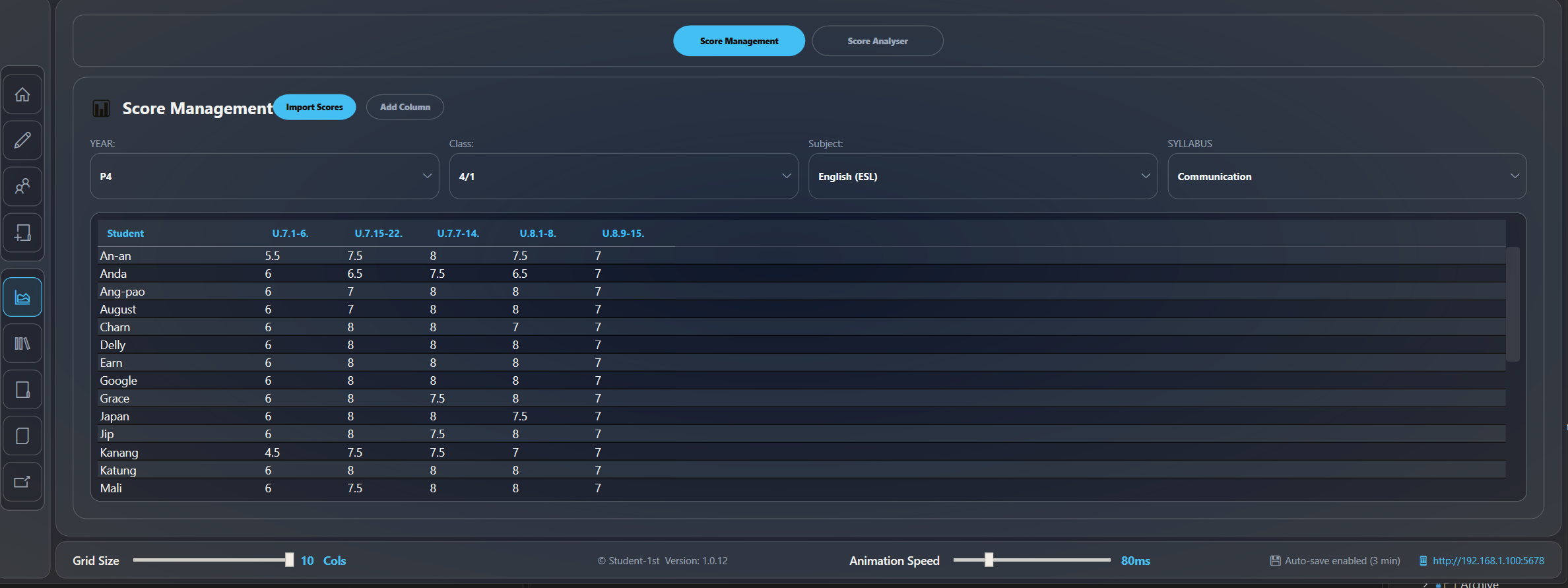
After import, every score for a subject appears in a single grid — all classes, all students, all time periods.
| Student | U.1 (1–6) | U.1 (7–14) | U.2 (16–21) | U.7 (1–6) | U.7 (15–22) | U.8 (1–8) |
|---|---|---|---|---|---|---|
| An-an | 5.5 | 8 | 5.5 | 5.5 | 7.5 | 7.5 |
| Anda | 6 | 7.5 | 6 | 6 | 6.5 | 6.5 |
| Kanang | 4.5 | 7.5 | 6 | 4.5 | 7.5 | 7 |
| Mali | 6 | 8 | 5 | 6 | 7.5 | 8 |
Real import results — P4 English Grammar, Class 4/1. Two CSV imports, one form, all scores visible in a single progression view. Import again next term — the same form updates with new columns.
Form per Subject/Syllabus
Not 20. Not one per import. One — always.
Duplicate Scores
Re-import as many times as you like — scores update, never multiply.
CSV Format
Map your columns your way — AIM adapts to your data, not the other way around.
Import Only What You Need — Skip the Rest
Other tools force you to import everything. AIM gives you control.
📋 Your CSV Has 15 Columns
You only need 6 of them. Map the 6 you want to the right subject and syllabus. Mark the other 9 as skip. They never touch your database.
✓ Existing Data Stays Safe
Your form already has Unit 1–4 scores. You're importing Unit 5–8. Only the mapped columns update. Unit 1–4 data is untouched. Import partial data, add to existing forms — without fear.
🔄 Re-Import = Update
Scores were updated in the source system. Re-import the same CSV. AIM detects existing scores and updates them — no duplicates created, no manual cleanup required.
See AIM in Action
Request a demo and see how AIM imports, maps, and tracks scores — in seconds, not hours.
Request Demo